For brands
Free up hours without losing control of your ad account.
STRMLINE optimizes your account every night and watches it all day — including outside working hours, when opportunities are otherwise lost.
Get your evenings and weekends back.
One optimization round runs every night, freeing hours for the things that actually move performance — creative, offers, strategy.
Never miss what happens after hours.
It watches your account all day, every day, so an opportunity outside office hours doesn't wait until Monday.
You still make the final call.
Anything past the limit you set lands in Slack with the numbers and the reasoning, and waits for your approval.
Built for a brand that can't watch its own account all day.
The same nightly round and the same guardrails, whether it's a Tuesday afternoon or a Sunday you didn't plan to work.
What happens to your account while you're not working?
Every account gets one full optimization round a night, at your account's local midnight — the earliest moment a full day of yesterday's data can be acted on. Between rounds it watches all day for delivery, tracking and connection problems, weekends and holidays included, and messages you in Slack the moment one needs you.
See how it works →What do you get back?
Hours you'd spend opening Ads Manager, walking every campaign and ad set, and weighing different time windows against each other. Time that goes back into creative, offers, and the other things that actually move performance — not into checking budgets every morning.
See what it saves for your spend →How do you stay in control?
You set the ROAS target and the weekly spend cap, and one guardrail: how big a budget move it may make on its own. Anything past that line arrives in Slack with the numbers and the reasoning behind it, and waits for your approval before anything changes. Every change is something you can point to and explain — to your team, or whoever asks.
See guardrails →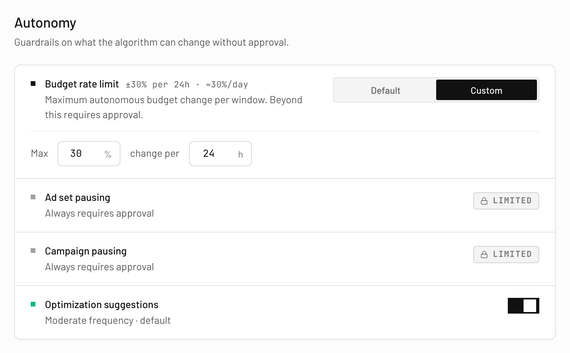
Five questions. Straight answers.
Yes, for Meta ad accounts running purchase campaigns, optimized on ROAS — that's what it reads and acts on today. Lead-generation campaigns aren't supported yet.
You connect through Meta's own login. It asks for exactly three permissions: read your campaigns and results, change budgets and turn campaigns or ad sets off, and read your Business Manager's name. It never touches creative, audiences, bids or account structure — and shadow mode lets you watch it decide, writing nothing to Meta, for as long as you want.
Your average spend is checked every month. If it moves you into a different price band, you get an email five days before renewal, either direction — accept it early, or let it apply automatically. If it settles back down first, nothing is charged.
In the app, in two clicks, without asking anyone — no notice period and no exit fee. You keep access until the period your last payment covers ends.
Full optimization from day one, in shadow mode or live — no card required, and you're not charged unless you start a subscription. If it ends first, optimization pauses but your workspace and history stay exactly as you left them.
Private beta — founding seats open
Take your 14-day free trial.
Watch shadow mode decide on your real account.
Connect an account, keep it in shadow mode, and read the log the next day. The first 14 days cost nothing.